> ## Documentation Index
> Fetch the complete documentation index at: https://docs.engramhq.com/llms.txt
> Use this file to discover all available pages before exploring further.
# Connectors
> Connect Slack, Notion, meetings, code tools, and GTM systems so Aria has live context.
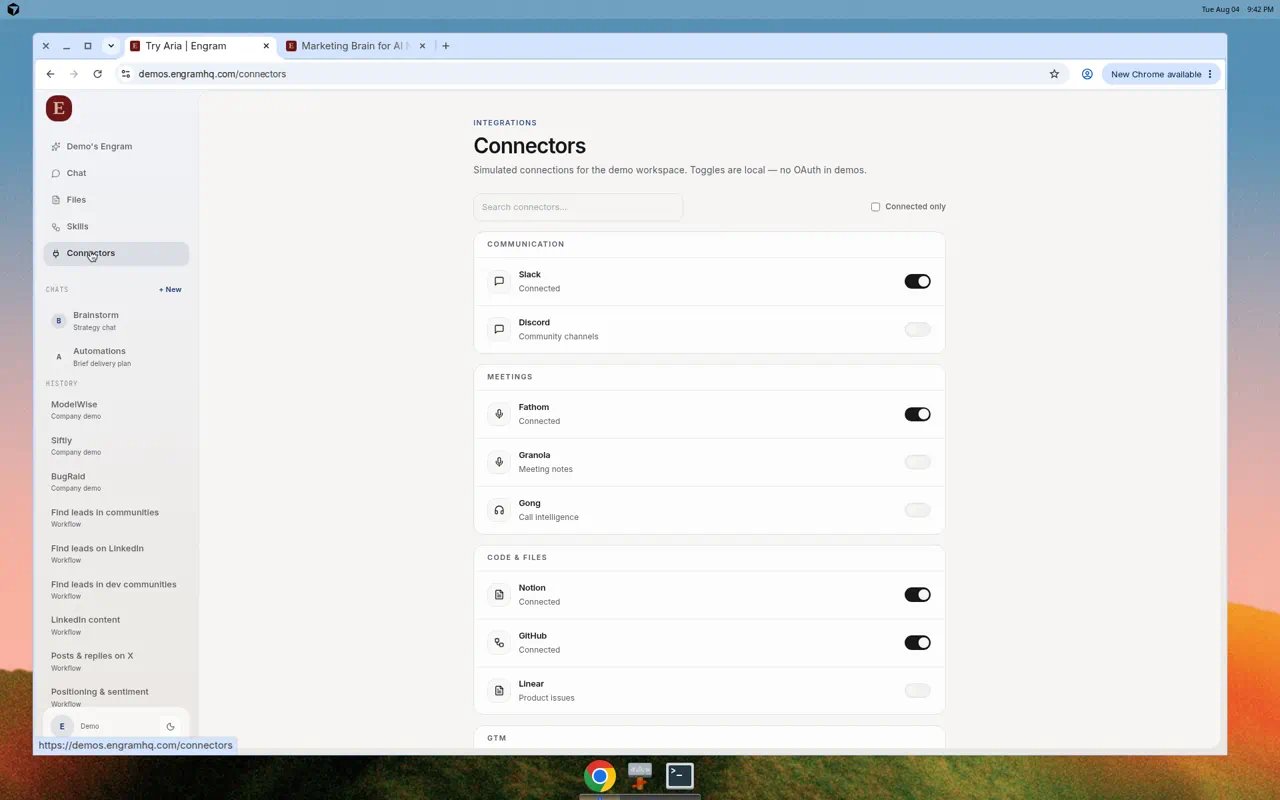
Nav label: **Connectors**. Page title: **Integrations**. Connectors give Aria live context from tools you already use.
 ## How to connect
Choose **Connectors** in the left nav.
Search, or filter with **Connected only**.
Toggle or click connect and finish signing in (or paste an API key when the product asks for one).
Status should show **Connected**. For Slack, complete channel setup and **Add Aria to Slack** when prompted.
## Connector map
| Group | Tools | Typical use |
| --------------------- | --------------------------------- | --------------------------------- |
| Communication | Slack, Discord | Channels, posts, Aria in Slack |
| Meetings | Fathom, Granola, Gong | Transcripts and call intelligence |
| Knowledge & files | Notion, Google Drive | Docs and knowledge base |
| Product & engineering | GitHub, Linear | Issues and repo context |
| CRM & sales | HubSpot, Salesforce, Apollo, Clay | Pipeline and account context |
| Automation | Zapier | Cross-tool automation |
Figma and Jira may appear as Coming soon.
## How to connect
Choose **Connectors** in the left nav.
Search, or filter with **Connected only**.
Toggle or click connect and finish signing in (or paste an API key when the product asks for one).
Status should show **Connected**. For Slack, complete channel setup and **Add Aria to Slack** when prompted.
## Connector map
| Group | Tools | Typical use |
| --------------------- | --------------------------------- | --------------------------------- |
| Communication | Slack, Discord | Channels, posts, Aria in Slack |
| Meetings | Fathom, Granola, Gong | Transcripts and call intelligence |
| Knowledge & files | Notion, Google Drive | Docs and knowledge base |
| Product & engineering | GitHub, Linear | Issues and repo context |
| CRM & sales | HubSpot, Salesforce, Apollo, Clay | Pipeline and account context |
| Automation | Zapier | Cross-tool automation |
Figma and Jira may appear as Coming soon.
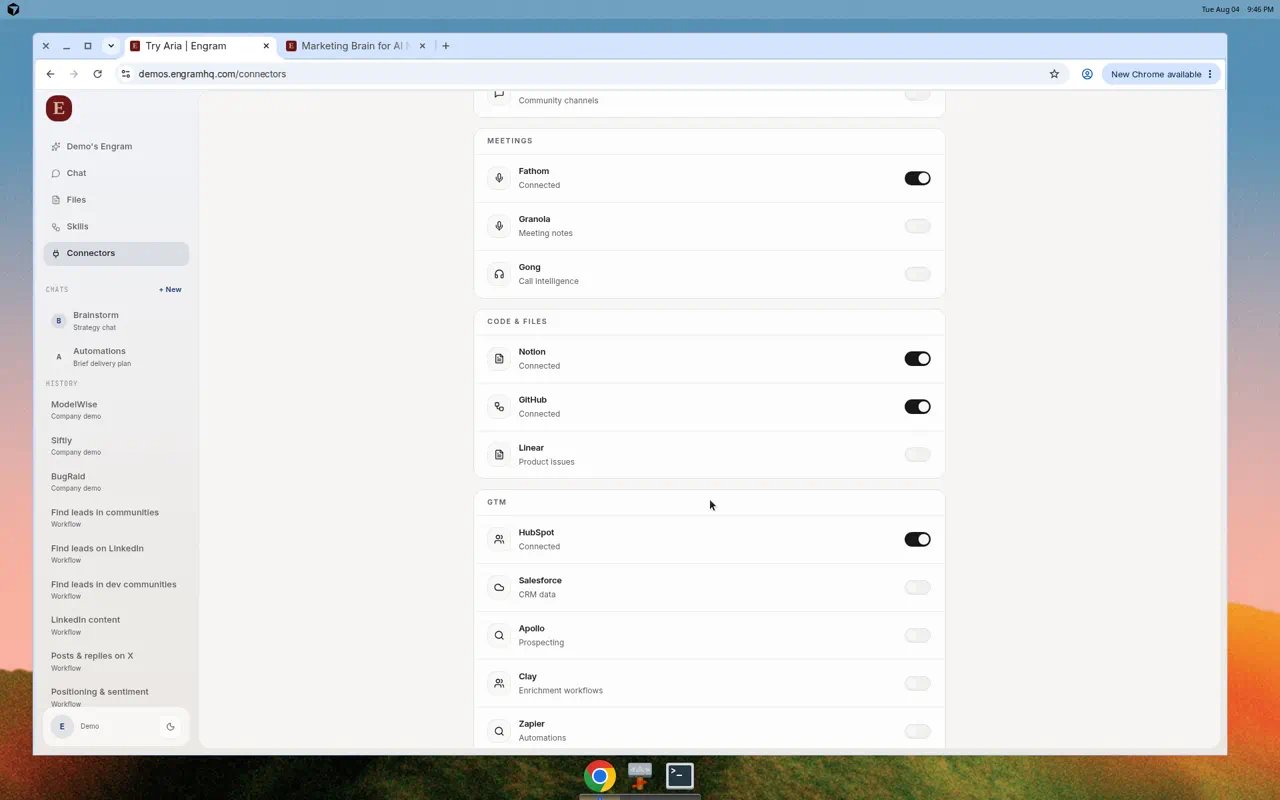 Connections belong to the active brand. Switch brands in the sidebar before you connect a tool if you manage more than one workspace.
## Use Engram from Cursor or Claude
Want Cursor, Claude Desktop, or another AI tool to use these same connectors? Create an **MCP API key** under **Connectors → MCP Access**. See [Connect Cursor and Claude](/guides/mcp).
## Real use cases
Connect Slack. After Aria drafts a brief in Chat, ask Aria to post it to the agreed channel, or paste from Files.
Connect Notion. Ask Aria questions that reference a page your team already maintains.
Connect Fathom. Ask Aria to turn the latest transcript into a positioning note, then promote it to Files.
## Disconnect safely
Turn the connector off in Engram and revoke the app in the provider admin console when a teammate leaves or access should stop.
## Related
* [Connect Cursor and Claude](/guides/mcp)
* [Aria on Telegram and Slack](/guides/aria-channels)
* [Files](/guides/files)
* [Team](/guides/team)
Connections belong to the active brand. Switch brands in the sidebar before you connect a tool if you manage more than one workspace.
## Use Engram from Cursor or Claude
Want Cursor, Claude Desktop, or another AI tool to use these same connectors? Create an **MCP API key** under **Connectors → MCP Access**. See [Connect Cursor and Claude](/guides/mcp).
## Real use cases
Connect Slack. After Aria drafts a brief in Chat, ask Aria to post it to the agreed channel, or paste from Files.
Connect Notion. Ask Aria questions that reference a page your team already maintains.
Connect Fathom. Ask Aria to turn the latest transcript into a positioning note, then promote it to Files.
## Disconnect safely
Turn the connector off in Engram and revoke the app in the provider admin console when a teammate leaves or access should stop.
## Related
* [Connect Cursor and Claude](/guides/mcp)
* [Aria on Telegram and Slack](/guides/aria-channels)
* [Files](/guides/files)
* [Team](/guides/team)